Understanding Color Print Image Basics
Creating vibrant, accurate, and high-quality color prints begins with a comprehensive understanding of the foundational elements involved in the printing process. These fundamentals primarily relate to color modes, resolution, and file formats, all of which significantly influence the final output's appearance and fidelity. Mastery of these aspects ensures that your images will be displayed with vivid colors, sharp details, and true-to-original clarity when transferred onto various printing media.
Color Modes in Printing
Color modes are standard settings within image editing software that determine how colors are processed and reproduced. The two primary modes for printing are RGB (Red, Green, Blue) and CMYK (Cyan, Magenta, Yellow, Key/Black). RGB is typically used for digital displays and online images, offering a broad spectrum of colors. However, for physical prints, CMYK color mode is preferred as it closely matches the actual ink process used in printers. Converting images from RGB to CMYK is crucial to predict how colors will appear once printed, preventing unexpected shifts or dullness in the final output.
Resolution and Image Quality
Resolution, measured in pixels per inch (PPI), directly impacts the sharpness and detail of a printed image. For high-quality color prints, a minimum resolution of 300 PPI is generally recommended for standard print sizes. Lower resolutions may result in pixelation and blurry details, especially in large-format prints. Ensuring your digital files are prepared at the appropriate resolution before printing preserves the integrity of the visual presentation.
File Formats Suitable for Printing
The choice of file format affects both the quality and compatibility with printing equipment. Commonly accepted formats include TIFF and PDF, which retain high image quality and support color profiles. JPEG files, while widely used, tend to involve compression that can degrade quality, making them less ideal for professional printing. Using uncompressed or minimally compressed files prevents quality loss and ensures color accuracy and detail are maintained throughout the printing process.
Role of Color Profile Management
Color profiles are embedded within image files and define how colors should appear in relation to specific printing devices or media. Managing color profiles correctly helps achieve consistent reproduction across various printers and materials. When preparing images for print, selecting the appropriate color profile—commonly Adobe RGB or specific printer profiles—aligns the virtual colors with how they will appear physically, guaranteeing precision and consistency in the final printout.
Conclusion
Understanding the basics of color print images is vital for producing professional-quality results. Mastery of color modes, resolution, file formats, and color management lays the groundwork for high-fidelity printing. Ensuring that digital images are correctly prepared not only enhances visual impact but also optimizes the printing process, resulting in vibrant and accurate color reproductions that meet industry standards and client expectations.
Understanding Color Print Image Basics
When it comes to producing high-quality color prints, grasping the fundamental elements of color print images is essential. This involves understanding the significance of image resolution, color modes, and file formats, which all contribute to the final appearance and fidelity of the printed image. Correctly preparing these elements ensures that the printed output reflects the intended design with vibrant, accurate colors and sharp details.
Color Modes and Their Impact
Color mode selection plays a critical role in how colors are rendered in printed images. The most common modes for print design include RGB (Red, Green, Blue) and CMYK (Cyan, Magenta, Yellow, Black). RGB is primarily used for digital displays, while CMYK is tailored for print media because it aligns with the ink process used in most printers. Converting images from RGB to CMYK during the preparation phase helps predict how colors will turn out once printed, minimizing unexpected color shifts.
Image Resolution and Its Significance
High-resolution images are vital for achieving crisp, detailed prints. A resolution of at least 300 dots per inch (DPI) is generally recommended for professional color printing. This resolution ensures that the printed image retains clarity and sharpness without pixelation or blurriness. When preparing images, checking and adjusting the resolution prior to printing is crucial, especially since enlarging low-resolution images can significantly compromise quality.

Choosing Appropriate File Formats
The choice of file format directly influences print quality and compatibility. Lossless formats like TIFF and PDF are preferred because they support high resolution and retain all color profile information, ensuring accurate color reproduction. JPEGs, although commonly used for digital images, involve compression that can introduce artifacts and degrade image quality. For professional color print images, using uncompressed or minimally compressed files preserves the integrity of intricate details and color richness.
Understanding Color Profiles and Their Management
Accurate color reproduction heavily depends on the correct management of color profiles. Embedding appropriate profiles like Adobe RGB or specific printer profiles within image files guides the printing device to replicate colors as intended. Proper color profile management accounts for differences in displays and print media, reducing discrepancies and ensuring consistency across multiple prints.
Implementing Effective Color Management
Effective color management encompasses calibrating monitors, calibrating printers, and utilizing color management systems (CMS) to synchronize digital colors with physical outputs. Regular calibration ensures that on-screen colors match the colors of the final print, eliminating surprises and minimizing waste. Industry-standard tools and software enable precise control over color consistency, which is especially important for projects demanding exact color matching.
Best Practices for Ensuring Color Accuracy
- Use calibrated monitors to preview color accuracy before printing.
- Embed correct color profiles within your files during preparation.
- Select high-quality, ICC-compliant printer profiles specific to your printing device and media.
- Conduct test prints to compare digital previews with physical outputs and make necessary adjustments.
- Maintain consistent workflow processes to prevent inadvertent color shifts through multiple stages of editing and printing.
Achieving precise and vibrant color prints involves a combination of proper file preparation, understanding of color profiles, and systematic calibration. By mastering these core principles, you can ensure that your color print images are reproduced with fidelity, depth, and visual impact that meet professional standards.
Understanding Color Print Image Basics
Mastering the fundamentals of color print images is essential for producing high-quality, vibrant visuals that accurately reflect the original digital design. This involves an understanding of various color models, the role of color profiles, and how digital images translate into physical prints. In the context of professional printing, the RGB (Red, Green, Blue) color model used for digital displays must be converted into the CMYK (Cyan, Magenta, Yellow, Key) color space, which is used by most printing devices. This conversion process is crucial to maintain color fidelity, as mismatches can lead to dull or inaccurate reproductions of the intended hues.
Color profiles serve as standard references that define how colors are interpreted and rendered across different devices and media. Embedding the correct color profile within your image files ensures that the colors you see on your screen are maintained during the printing process. Without proper profile management, colors may shift unexpectedly, resulting in prints that do not meet expectations in terms of saturation, brightness, or overall tone. When preparing images for print, it is also important to consider the print medium and substrate, as these can significantly influence how colors appear physical output versus on-screen representations.
Achieving consistent color reproduction requires understanding the interplay between digital color management and the physical printing environment. Consistently managing these factors, from color profiling to calibration, minimizes discrepancies, enhances color accuracy, and improves overall image quality. This foundational knowledge empowers professionals and enthusiasts alike to produce precisely what is envisioned during digital design, captured accurately in the final printed output.

Selecting the Right Printing Materials
The choice of printing media has a profound impact on the appearance and durability of your color print images. Selecting compatible substrates—such as gloss, matte, photo paper, or specialty materials—depends on the desired finish, color vibrancy, and application of the print. High-quality media ensures that colors are reproduced accurately and consistently, providing a smooth surface for ink adhesion and minimizing color bleed or fading over time.
When choosing media, consider the properties related to ink absorption and reflectivity. Glossy papers tend to produce more vibrant colors and sharper details but may reflect surface glare, while matte finishes reduce glare and provide a softer, more subdued look. For archival quality and longevity, select papers that are acid-free and designed for high-resolution color printing. Using the correct media type not only enhances visual impact but also prolongs the lifespan of the print, preserving color fidelity over years of display or handling.

Choosing the Right Printer and Ink System
For optimal color print quality, selecting the appropriate printer and ink system is crucial. Professional-grade inkjet and laser printers are tailored for different applications, with inkjet printers known for their superior color accuracy and photo reproduction capabilities, while laser printers excel in speed and document quality. When working with color images, opt for printers that support a wide color gamut and are compatible with high-quality ICC profiles specific to the device.
The type of ink used also influences the vibrancy, stability, and longevity of print images. Pigment-based inks tend to offer better lightfastness and resistance to environmental factors compared to dye-based inks, making them ideal for archival and exhibition purposes. Additionally, using original manufacturer inks and consumables ensures consistent output quality and color fidelity. Integrating quality controls—such as regular printer calibration and maintenance—further guarantees predictable and accurate color reproduction across print runs.
Understanding Color Print Image Basics
Achieving vivid, true-to-life color print images relies heavily on several foundational technical aspects. Color print images are created through complex processes that translate digital color data into physical ink or toner on various media. The core of this process involves understanding how colors are represented digitally versus how they appear when printed. Digital images utilize color models like RGB (Red, Green, Blue), which are suited for screens, while printers typically operate using CMYK (Cyan, Magenta, Yellow, Black) color spaces. Converting between these models requires careful color management to maintain color accuracy and vibrancy.
Color depth and resolution play critical roles in determining the richness of printed images. Higher resolution files with a minimum of 300 DPI ensure that detailed images retain clarity and sharpness when printed at larger sizes. Conversely, lower resolution images may appear pixelated or blurry, compromising the visual impact of the final print. Color fidelity, or the closeness of printed color to the original digital file, depends on precise calibration and consistent color profiles, matching the digital design’s intent with the physical output.
Understanding the significance of color gamut is vital. The color gamut denotes the range of colors a device can reproduce. Monitors and printers can have varying gamuts, which sometimes limits the appearance of certain hues when printing. Selecting devices that support broad color gamuts and utilizing ICC profiles—standardized color management files—ensure that the hues and shades in a color print image closely resemble the source design. This alignment minimizes color shifts and guarantees the final print matches artistic or branding specifications.

Implementing proper color management workflows, including monitor calibration, profile embedding, and consistent printer settings, is key. Calibrated screens provide a reliable preview, allowing designers to make necessary adjustments before printing. Similarly, choosing the right printing profile tailored for specific media ensures consistent results, reducing waste and reprint costs. When aligned accurately, all these technical factors work seamlessly to produce color print images with stunning fidelity, clarity, and vibrancy.
Understanding Color Print Image Basics
Creating high-quality color print images begins with a clear understanding of the fundamental principles of color reproduction. Digital images are composed of RGB (Red, Green, Blue) color models, which are optimized for screens. Transitioning these designs to physical prints involves converting from RGB to CMYK (Cyan, Magenta, Yellow, Key/Black), the color space used in most commercial printing processes. This conversion is crucial because certain hues available on digital displays may not be directly reproducible in print, necessitating adjustments to maintain visual consistency. The quality of a color print image hinges on accurately managing color data through calibration, alignment, and appropriate media selection. In addition to color space conversion, understanding color gamuts enables designers and print operators to anticipate the range of colors attainable by their printing equipment. The gamut defines the subset of visible colors that a device can reproduce, which varies significantly between monitors and printers. By employing ICC profiles—standardized files that describe the color attributes of specific devices—users can neutralize discrepancies, ensuring that the digital design aligns with the physical output. These profiles assist in managing color fidelity across different devices and media, minimizing color shifts and preserving the intended visual impact. Achieving optimal results involves meticulous workflow management, starting from accurate color profile embedding in digital files to consistent calibration of monitors and printers. When the entire production process maintains precise color management practices, the resulting color print image exhibits vibrant, accurate hues, sharp contrasts, and detailed gradations. Proper calibration and profile consistency also help prevent common issues such as color bleeding or dullness, ensuring that every print reflects the original artwork or branding intent.

Selecting the Right Printing Materials
Choosing the appropriate printing substrate is a critical factor in achieving vivid, durable color print images. The type of paper or media used can significantly influence color vibrancy, sharpness, and longevity. Glossy papers tend to enhance color saturation and contrast, making images appear more vibrant and eye-catching. Matte surfaces, on the other hand, offer a more subdued finish that reduces glare and is suitable for detailed artwork or photographs where clarity is essential. Specialty papers, such as fine art or textured media, provide unique tactile experiences and color presentation, adding value to high-end projects. When selecting printing materials, consider the compatibility with your chosen printing technology. Inkjet printers, for example, often produce superior color fidelity on high-quality, coated papers designed for aqueous inks. Laser printers require media that can withstand high heat and pressure without warping or toner smudging. Digital presses demand media with precise weight and surface characteristics to ensure consistent ink adhesion and color density. Color retention and lifespan are also vital considerations. Archival-quality papers and inks resist fading over time, which is instrumental for projects intended for long-term display or archival purposes. Ensuring the moisture content and surface smoothness of the media are within recommended specifications helps achieve consistent color output and reduces waste due to media misalignment or defects.
Color Calibration and Management
Implementing effective color calibration protocols is essential for producing accurate color print images consistently. Regular calibration of monitors ensures that the digital design preview accurately represents what will be printed, providing a reliable reference point for adjustments. Utilizing hardware calibration tools and software that support ICC profiles enables precise color matching, minimizing discrepancies. Color management workflows should extend beyond the screen. Calibration of printers involves adjusting their output parameters, such as ink density, to align with standardized color profiles corresponding to specific media. Embedding ICC profiles within digital files ensures that color information remains intact throughout the workflow, from design to final print. Maintaining a controlled environment—free from excessive ambient light and temperature fluctuations—further stabilizes color reproduction. Additionally, using soft proofing techniques allows designers and operators to simulate how colors will appear on specific media before committing to expensive print runs. This proactive approach significantly reduces waste and rework, ensuring the final color print image aligns with expectations.

Ensuring Precision Through Color Management Tools
Utilizing advanced color management tools is critical for achieving consistent and accurate color reproduction in high-quality color print images. Hardware calibration devices, such as spectrophotometers and colorimeters, are integral in creating and maintaining precise ICC profiles for both monitors and printers. These profiles serve as digital references that guide color adjustments, ensuring that what is designed on screen closely matches the output on print media. Incorporating Software Solutions Sophisticated color management software acts as a bridge between digital design and physical reproduction. These programs enable users to embed ICC profiles directly into print files, maintain color consistency across multiple devices, and perform soft proofing to simulate final print appearance. Such software often includes features to match specific media types, ensuring the vibrancy and accuracy of colors are preserved regardless of the substrate used. Regular Calibration and Profiling Routine calibration of display devices and printers is essential to maintain accurate color output over time. This includes adjusting monitor brightness, contrast, and color settings, as well as fine-tuning printer parameters such as ink density and droplet size. Establishing a periodic calibration schedule minimizes drift in color output, especially in environments with varying ambient conditions. For expansive printing operations, creating standardized color profiles tailored to specific media brands and types guarantees reproducibility. The profiles take into account the unique absorption and reflection properties of each substrate, enabling precise color matching across print runs. Monitoring Environmental Factors Ambient light, temperature, and humidity significantly influence color perception and the stability of print results. Printing in a controlled environment helps preserve color consistency and extends the lifespan of print materials. Installing proper lighting conditions, such as D50 or D65 light sources, ensures that color evaluations are accurate during QC checks. Ultimately, comprehensive color management relies on systematic calibration routines, utilization of high-quality color management tools, and a stable work environment. These practices collectively enable professional print providers to deliver vivid, true-to-design color print images that meet client expectations and industry standards.
Ensuring Accurate Color Representation in Print Images
Use of High-Quality Color Profiles
Implementing standardized color profiles is fundamental to achieving accurate and consistent color reproduction across various printing projects. Color profiles serve as a translation map between digital files and physical prints, ensuring that the colors intended during design are faithfully rendered on the printed media. Professionals typically utilize ICC (International Color Consortium) profiles tailored to specific printer models and substrates, which help maintain color fidelity regardless of environmental conditions or media variations.
In practice, selecting the correct ICC profile for the chosen paper or fabric ensures optimal color output. These profiles account for how different materials absorb and reflect ink, helping to mitigate issues like color shifting or dulling. When creating or purchasing projects, always verify that the profile aligns with your substrate to achieve predictable results that satisfy both clients and quality standards.
Advanced Color Management Systems
Adopting comprehensive color management workflows is essential for professional-grade color print images. These systems integrate hardware calibration tools, such as spectrophotometers, with software solutions that automate the calibration and profiling processes. Regular calibration of monitors and printers ensures that your color outputs are consistent over time, minimizing discrepancies between digital design and printed results.
By embedding color management practices into your workflow, you establish a repeatable process that reduces waste and reprints. Automated profiles and calibration routines help maintain color accuracy even when dealing with batch jobs or different media types, thus elevating the overall quality and reliability of your color prints.
Maintaining Consistency Across Printing Batches
Consistency in color print images requires meticulous attention to detail through each stage of the printing process. Establishing standardized routines—such as pre-print calibration, regular media testing, and environmental controls—contributes significantly to stable output quality. Keeping detailed records of calibration settings and environmental conditions for each batch also helps replicate results precisely.

In addition to technical adjustments, quality control measures like test prints and visual evaluations against color references are critical. Comparing sample prints against original digital files, under controlled lighting, ensures the final product matches the intended palette. This rigorous approach to color verification supports high standards for professional print services, ensuring clients receive vibrant, true-to-design images that meet their expectations.
Ensuring Long-Term Color Fidelity Through Proper Equipment Maintenance
Achieving consistently vibrant and accurate color print images hinges on the diligent upkeep of your printing machinery. Regular maintenance routines not only extend the lifespan of your equipment but also ensure that color outputs remain true to the original digital designs across various print jobs. Maintaining optimal performance involves several key practices that should be integrated into your standard operating procedures.
Routine Inspection and Cleaning
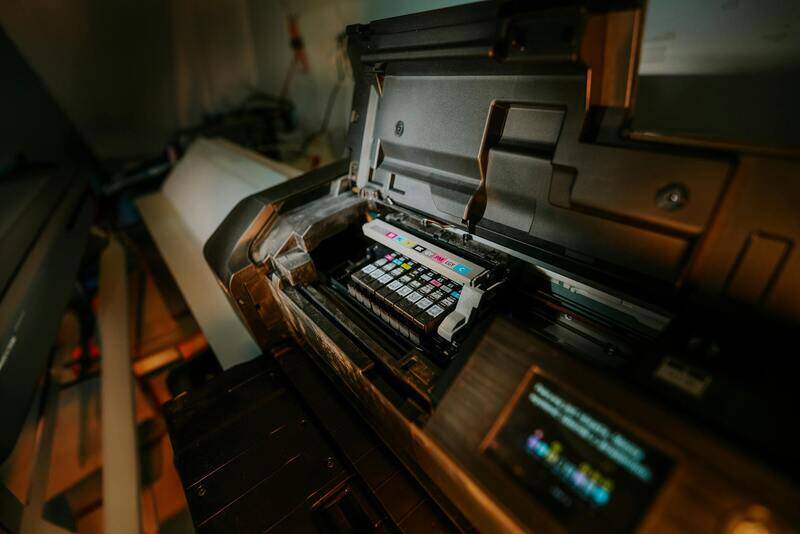
Begin with comprehensive inspections of all printing components, including print heads, rollers, and calibration sensors. Regular cleaning of print heads is crucial, especially when printing high-quality color images, as clogged nozzles can lead to streaks, color inconsistencies, and reduced sharpness. Use manufacturer-approved cleaning solutions and methods to prevent damage and maintain the precision of ink delivery. Additionally, keeping the interior of the printer free from dust and debris minimizes the risk of contamination that could impair color accuracy.
Calibration and Firmware Updates
Calibration is vital for preserving accurate color reproduction over time. Schedule routine calibration sessions using professional color management tools and software designed for your specific printer model. This ensures that color output remains consistent, even as components age or environmental conditions fluctuate. Firmware updates provided by the manufacturer often include enhancements in color handling algorithms, bug fixes, and new features that improve overall print quality. Installing these updates promptly is an essential aspect of ongoing equipment maintenance.
Replacing Consumables on Schedule
Inks, toner, and printing media are consumables that directly influence the vibrancy and fidelity of color prints. Monitor the usage levels meticulously and replace cartridges or toners before they are completely depleted to avoid color shifts or streaking caused by residuals or air intake. Use high-grade, media-specific paper and substrates recommended for your printer model to ensure that colors are rendered accurately and with consistency across different batches.
Environmental Control and Storage
Environmental conditions such as temperature, humidity, and lighting significantly impact the stability of color outputs. Maintaining a controlled environment in the print area minimizes the risk of ink drying issues, paper warping, or color drifts. Proper storage of consumables, away from direct sunlight and humidity, helps preserve their quality, contributing to reliable color reproduction during extended printing projects.

Record-Keeping and Preventive Measures
Keeping detailed records of maintenance schedules, calibration settings, and environmental conditions provides a valuable reference for troubleshooting and predicting future maintenance needs. Preventive measures, such as scheduling routine service checks with authorized technicians, can preempt potential issues that might compromise color fidelity. Implementing these practices helps sustain high standards for color print images, reducing rework and avoiding costly equipment downtime.
By committing to comprehensive maintenance and careful handling of printing equipment, organizations can consistently produce color print images that meet exacting standards. This ensures that every output is vibrant, precise, and aligned with the original design intent, solidifying professional credibility and client trust.